


In Singapore’s dynamic digital landscape, choosing the right foundation for your business website is a pivotal decision. The platform you select dictates not just the initial build, but also long-term flexibility, scalability, maintenance costs, and ultimately, your online growth potential. Businesses often grapple with three primary contenders: the ubiquitous WordPress, the design-centric Webflow, and the bespoke power of custom web development. Each offers a unique set of advantages and disadvantages, making the ‘best’ choice highly dependent on specific business needs, technical expertise, budget, and future aspirations.
This ultimate guide will meticulously break down WordPress vs Webflow vs Custom development, exploring their core functionalities, benefits, drawbacks, and ideal use cases, specifically tailored for Singaporean businesses. You’ll gain a comprehensive understanding of which platform aligns best with your strategic objectives, helping you make an informed decision that drives sustainable success in the competitive Singapore market.
Quick Answer / TL;DR: For Singaporean businesses, WordPress offers cost-effective flexibility ideal for content-heavy sites and SMBs. Webflow suits design-focused brands and agencies seeking visual control with managed hosting. Custom development provides unparalleled scalability and unique functionality for complex, high-growth enterprises requiring bespoke solutions. The best choice depends on budget, technical needs, design complexity, and long-term strategic goals.
What is WordPress and Why Is It So Popular?
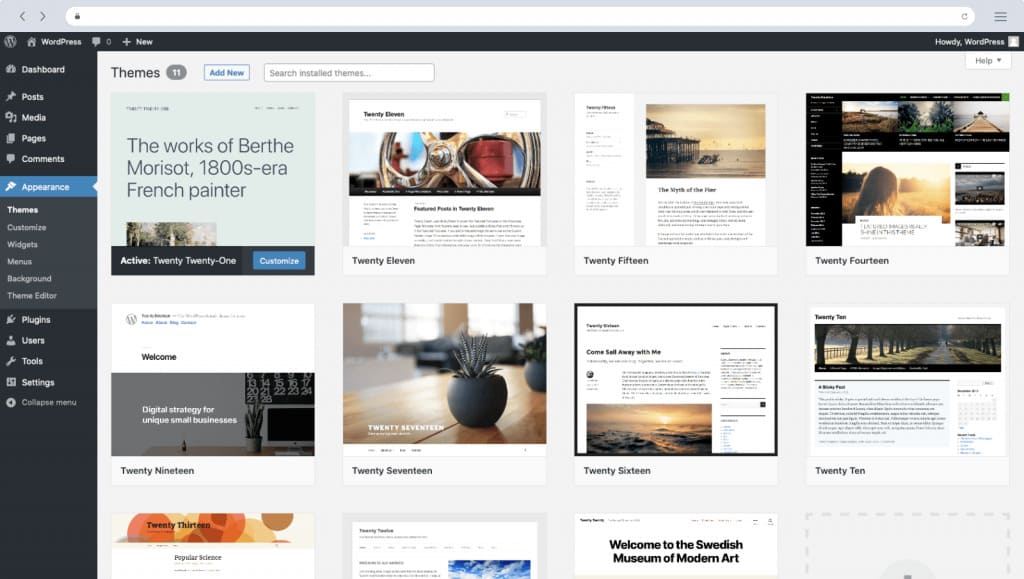
WordPress is an open-source Content Management System (CMS) that powers over 40% of all websites on the internet. Launched in 2003, it has evolved from a simple blogging platform into a versatile ecosystem capable of building almost any type of website, from personal blogs and portfolios to complex e-commerce stores and corporate sites. Its popularity stems from its accessibility, extensive feature set, and a massive global community.
Định nghĩa: WordPress is a free, open-source content management system written in PHP and paired with a MySQL or MariaDB database. It allows users to create and manage websites without needing to code from scratch.
Key Features and Ecosystem:
- Open-Source Nature: The core software is free to use, modify, and distribute. This fosters a vibrant community of developers who contribute to its continuous improvement.
- Extensive Plugin Library: With over 59,000 free plugins (and countless premium ones), WordPress offers functionalities for almost anything – SEO optimization, e-commerce (WooCommerce), contact forms, security, performance, and more.
- Themes for Design: Thousands of free and premium themes allow users to quickly change the aesthetic and layout of their website without coding.
- User-Friendly Interface: The WordPress dashboard is relatively intuitive, enabling users to create and publish content, manage media, and customize their site with ease.
- Scalability: While often associated with smaller sites, WordPress can scale to handle high-traffic websites with proper optimization, caching, and robust hosting solutions.
- SEO-Friendly: WordPress is inherently SEO-friendly, and with plugins like Yoast SEO or Rank Math, users can optimize their content and technical aspects for search engines effectively.
Advantages for SG Businesses:
- Cost-Effectiveness: The core software is free, and numerous free themes and plugins keep initial development costs low. Hosting is also generally affordable.
- Flexibility: From simple blogs to complex e-commerce platforms, WordPress can be adapted to various business models.
- Large Talent Pool: Finding developers, designers, and agencies proficient in WordPress is relatively easy in Singapore, making support and maintenance accessible. For example, a reputable Web Design Agency in Singapore will almost certainly have WordPress expertise.
- Community Support: A vast global community means abundant resources, tutorials, and forums for troubleshooting and learning.
- Control and Ownership: Users have full control over their website’s code and data, unlike some SaaS platforms.
Disadvantages:
- Security Concerns: Due to its popularity, WordPress is a frequent target for hackers. Regular updates, strong passwords, and security plugins are crucial.
- Performance Issues: Poorly coded themes or plugins, or inadequate hosting, can lead to slow website speeds if not managed correctly.
- Maintenance Overheads: Keeping themes, plugins, and the core software updated is essential for security and performance, which can be time-consuming.
- Learning Curve for Advanced Customization: While basic usage is easy, significant customization often requires coding knowledge or reliance on developers.
Understanding Webflow: The Designer’s Power Tool
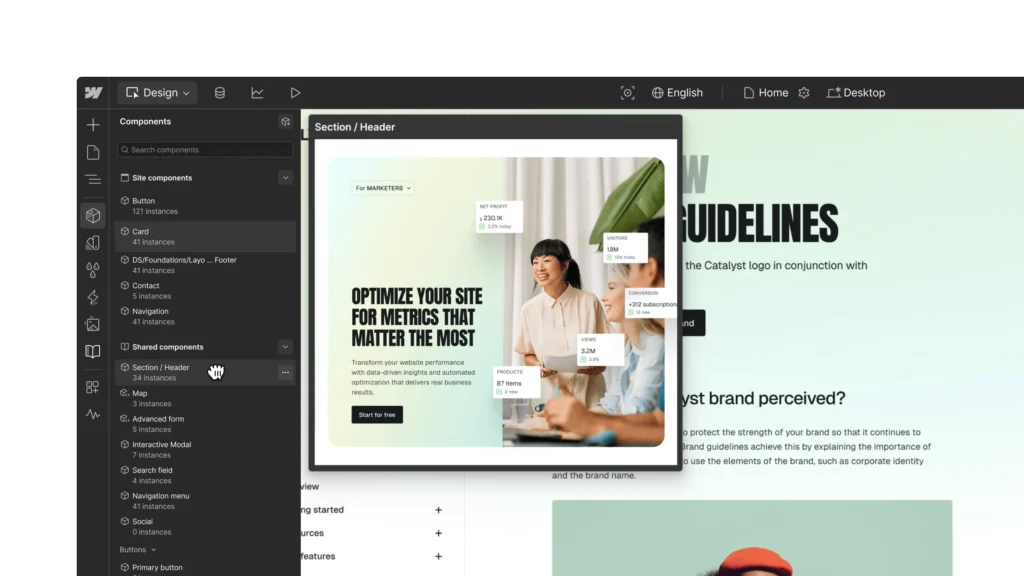
Webflow emerged as a strong contender for designers and agencies seeking more visual control and less reliance on code than traditional CMS platforms. It’s a Software-as-a-Service (SaaS) platform that combines CMS functionalities with a powerful visual designer, allowing users to build responsive websites with semantic HTML, CSS, and JavaScript without writing a single line of code.
Định nghĩa: Webflow is a cloud-based web design and development platform that allows users to design, build, and launch responsive websites visually, while also providing a built-in content management system and hosting.
Key Features and Philosophy:
- Visual Development: Webflow’s core strength is its drag-and-drop visual editor that generates clean, semantic code. Designers can directly manipulate HTML elements, CSS styles, and JavaScript interactions.
- Integrated CMS: It includes a robust CMS for managing dynamic content (blog posts, products, team members), which can be structured and styled visually.
- E-commerce Capabilities: Webflow offers integrated e-commerce features, allowing businesses to build and manage online stores directly within the platform.
- Managed Hosting: Webflow provides secure, fast, and scalable hosting optimized for its platform, eliminating the need for users to manage separate hosting providers.
- Animations and Interactions: A powerful animation engine allows for complex, engaging interactions and animations without custom coding.
- Collaboration Tools: Designed for agency workflows, Webflow includes features for team collaboration and client handoff.
Advantages for SG Businesses:
- Design Freedom: Offers unparalleled design flexibility for non-coders, allowing for highly unique and branded websites.
- Performance: Websites built on Webflow are generally fast and performant due to optimized hosting and clean code generation.
- Security: As a SaaS platform, Webflow handles security updates and patches, reducing the burden on business owners.
- Streamlined Workflow: Combines design, development, CMS, and hosting into a single platform, simplifying the website management process.
- Future-Proofing: Webflow continuously updates its platform, ensuring access to the latest web technologies and best practices.
Disadvantages:
- Higher Cost: Webflow’s pricing, especially for e-commerce or higher-traffic sites, can be significantly more expensive than WordPress hosting plus plugins.
- Steep Learning Curve: While visual, mastering Webflow’s design interface and understanding its underlying box model can be challenging for beginners without design or development fundamentals.
- Less Plugin/Integration Ecosystem: Compared to WordPress, Webflow has a smaller marketplace for third-party integrations and plugins, though it does support custom code embeds and Zapier integrations.
- Vendor Lock-in: As a SaaS platform, you’re tied to Webflow’s ecosystem for hosting and core functionalities. Migrating away can be complex.
The Power of Custom Web Development: Building from Scratch
Custom web development refers to building a website from the ground up using programming languages (like Python, JavaScript, Ruby, PHP frameworks, etc.) and databases, without relying on off-the-shelf CMS platforms or visual builders. This approach offers the ultimate flexibility and control, tailored precisely to a business’s unique requirements.
Định nghĩa: Custom web development involves creating a website or web application from scratch, writing all the code specifically for the client’s needs, rather than using pre-built templates, themes, or existing CMS platforms.
Key Characteristics and Process:
- Bespoke Functionality: Every feature, every integration, every user flow is designed and coded to meet specific business processes and user demands.
- Choice of Technologies: Developers can choose the most appropriate programming languages, frameworks (e.g., React, Angular, Vue for frontend; Node.js, Django, Laravel for backend), and databases (e.g., PostgreSQL, MongoDB) for optimal performance and scalability.
- Full Control: Businesses have complete ownership and control over the codebase, infrastructure, and future direction of their website.
- Scalability and Performance: Custom solutions can be engineered for extreme scalability and optimized for peak performance, handling massive traffic or complex data processing.
- Integration Capabilities: Seamless integration with existing internal systems (ERPs, CRMs, legacy software) is a key advantage.
Advantages for SG Businesses:
- Unique Competitive Edge: A custom website can incorporate unique features that differentiate a business from competitors, providing a distinct market advantage.
- Optimal Performance: Tailored code means no unnecessary bloat, leading to faster loading times and better user experience.
- Unrestricted Scalability: The ability to scale horizontally or vertically without platform limitations, accommodating future growth and evolving business needs.
- Enhanced Security: Custom solutions can be built with specific security protocols and audits in mind, reducing vulnerabilities inherent in widely used platforms.
- Perfect Fit: The website perfectly aligns with business workflows, reducing manual effort and increasing operational efficiency.
- Full Ownership: Complete control over the intellectual property of the code, which can be a significant asset.
Disadvantages:
- Highest Cost: Custom development requires significant investment in development hours, specialized talent, and ongoing maintenance.
- Longer Development Time: Building from scratch is a time-intensive process, often taking months or even years for complex projects.
- Reliance on Developers: Businesses are heavily reliant on their development team for any changes, updates, or maintenance.
- Higher Maintenance Costs: Updates, bug fixes, and new feature development all require developer time.
- Potential for Scope Creep: Without clear project management, custom projects can easily go over budget and timeline.
See also:
👉 Slow Website? Our Web Design Agency Can Make It Lightning Fast
👉 Freelancer vs Web Design Agency | Which Option Saves More Money?
Key Differences: WordPress vs Webflow vs Custom
Understanding the fundamental distinctions between these three approaches is crucial for making an informed decision. Here’s a breakdown of their core differences across several key aspects.
Flexibility and Customization
- WordPress: High flexibility. Highly customizable through themes and plugins. Requires some coding knowledge for deep customization or relies on developers.
- Webflow: Very high flexibility, especially for design. Offers visual control over HTML/CSS. Custom code can be embedded, but core functionality is within the Webflow environment.
- Custom Development: Ultimate flexibility. Absolutely no limitations on design, functionality, or integration. Everything can be built to spec.
Ease of Use and Learning Curve
- WordPress: Relatively easy for beginners for basic content management. Moderate learning curve for advanced theme/plugin configuration. Steep for custom theme/plugin development.
- Webflow: Moderate to steep learning curve. While visual, it requires understanding web design principles (box model, responsive design) to leverage its full power.
- Custom Development: Requires professional developers. Zero ease of use for non-technical users in terms of building or modifying core functionality. Content management can be simplified with a custom CMS layer.
Cost Implications for SG Businesses
- WordPress: Lowest entry cost. Hosting starts from S$5-S$30/month. Themes can be free to S$100+. Plugins can be free to S$500+/year. Development costs vary widely (S$1,000 – S$10,000+ for small to medium sites).
- Webflow: Mid-range cost. Monthly plans range from S$14 – S$49 (for basic CMS/Business) or S$29 – S$212 (for e-commerce). No separate hosting cost. Development costs for a Webflow agency might be S$3,000 – S$15,000+.
- Custom Development: Highest cost. Initial development can range from S$15,000 to S$100,000+ for complex projects. Ongoing maintenance and feature development are also significant.
Performance and Scalability
- WordPress: Performance can vary widely. Heavily dependent on hosting, theme/plugin quality, and optimization. Can scale, but often requires robust hosting and performance tuning for high traffic.
- Webflow: Generally high performance due to optimized hosting and clean code. Scales well within its platform limits, though very high-traffic enterprise needs might push its boundaries.
- Custom Development: Highest potential for performance and scalability. Built for specific needs, allowing for optimized architecture, infrastructure, and code. Can handle virtually any traffic or data load.
Security and Maintenance
- WordPress: Requires active management of security (updates, plugins, backups). High potential for vulnerabilities if not maintained.
- Webflow: Managed security by Webflow. Less responsibility for the user. Automatic updates and backups.
- Custom Development: Security is built from scratch and requires ongoing vigilance from the development team. Maintenance (updates, bug fixes, server management) is entirely the client’s responsibility or handled by their development partner.
SEO Capabilities
- WordPress: Excellent SEO capabilities with dedicated plugins (Yoast, Rank Math). Full control over meta tags, schema, sitemaps, etc.
- Webflow: Strong built-in SEO features. Easy to manage meta tags, structured data, and redirects. Generates clean code that search engines love.
- Custom Development: SEO capabilities must be explicitly coded in. Offers complete control to implement any SEO strategy, but requires expertise.
See also:
👉 Website Design Company in Singapore: What Google Expects in 2025
👉 Website Development in Singapore Costs, Trends, and Best Practices
Comparison Table: WordPress vs Webflow vs Custom
| Feature / Aspect | WordPress | Webflow | Custom Development | Winner / Verdict |
|---|---|---|---|---|
| Cost (Initial & Ongoing) | Lowest entry, variable ongoing (hosting, plugins) | Mid-range, subscription-based (all-inclusive) | Highest, significant upfront & ongoing | WordPress (entry) / Webflow (predictable) |
| Design Flexibility | High (themes, page builders) | Very High (visual builder, clean code) | Unlimited (from scratch) | Custom Development |
| Ease of Use (for non-devs) | High (content editing) / Moderate (config) | Moderate (visual design) / Steep (advanced) | Low (requires dev) | WordPress (for content) |
| Scalability | Good (with optimization & hosting) | Very Good (managed hosting) | Excellent (engineered for specific needs) | Custom Development |
| Performance | Variable (depends on setup) | Generally High (optimized hosting) | Highest potential (tailored optimization) | Custom Development |
| Security | User responsibility (updates, plugins) | Managed by Webflow (SaaS) | User responsibility (built-in, ongoing audits) | Webflow (managed) |
| Maintenance | User responsibility (updates, backups) | Managed by Webflow | Requires dedicated dev team | Webflow (managed) |
| SEO Control | Excellent (plugins, full control) | Excellent (built-in, clean code) | Excellent (full control, requires dev) | All three offer strong SEO potential |
| Development Time | Short to Medium | Short to Medium | Long | WordPress / Webflow |
| Talent Pool (SG) | Very Large | Growing (specialized) | Large (diverse tech stacks) | WordPress |
| Ideal For | Blogs, SMBs, e-commerce, content marketing | Agencies, designers, unique brand experiences | Complex web apps, enterprise, unique functionalities | Varies by need |
When to Choose WordPress for Your SG Business
WordPress is a phenomenal choice for a wide array of Singaporean businesses, especially those prioritizing cost-effectiveness, content management, and a broad ecosystem of features.
Ideal Use Cases:
- Small to Medium Businesses (SMBs): If you need a professional online presence, a brochure website, or a simple e-commerce store without breaking the bank, WordPress is a strong contender.
- Blogs and Content Marketing: Its roots as a blogging platform make it ideal for businesses that rely heavily on content marketing, SEO, and regularly publishing articles.
- E-commerce Startups (with WooCommerce): For businesses looking to quickly launch an online store with a manageable budget, WooCommerce (the e-commerce plugin for WordPress) offers a robust solution.
- Businesses with Budget Constraints: If initial investment is a major concern, WordPress provides a powerful platform with many free resources.
- Businesses Seeking Control Over Hosting: If you prefer to choose your own hosting provider and have full control over your server environment, WordPress offers that flexibility.
- Agencies Managing Multiple Client Sites: Many Web Development agencies in Singapore leverage WordPress for its efficiency in building and managing multiple projects.
Considerations for Singaporean Businesses:
- PSG Grant Eligibility: For eligible SMEs in Singapore, the Productivity Solutions Grant (PSG) can often cover a significant portion of the cost for pre-approved digital solutions, including e-commerce packages built on platforms like WordPress/WooCommerce. This makes it an even more attractive option.
- Local Payment Gateways: Ensure your chosen payment gateway integrates seamlessly with WooCommerce or other WordPress e-commerce plugins.
- Bilingual Support: WordPress has excellent capabilities for multilingual websites, which is often crucial for businesses targeting Singapore’s diverse population.
Original Insight: While WordPress is often perceived as a ‘DIY’ platform, Singaporean businesses often achieve significantly better results and long-term ROI by investing in professional WordPress development from a local agency. This ensures proper security, performance optimization tailored for the SG market (e.g., local CDNs), and adherence to local business standards, avoiding the common pitfalls of self-built sites.
When to Choose Webflow for Your SG Business
Webflow shines for businesses and agencies that prioritize visual design, brand consistency, and a streamlined development workflow, especially when a unique aesthetic is paramount.
Ideal Use Cases:
- Design-Driven Brands: Businesses where the visual experience and unique branding are critical to their identity (e.g., creative agencies, luxury brands, high-end F&B).
- Marketing Agencies: Agencies that build client websites and need a platform that offers both design freedom and a robust CMS for clients to manage content.
- Startups with Unique UI/UX Needs: If your product or service requires a highly interactive and visually engaging website to demonstrate its value.
- Businesses Needing Managed Hosting and Security: If you prefer to offload server management, security updates, and performance optimization to a reliable SaaS provider.
- Web Designers Who Don’t Code: For designers who want to bring their visions to life without relying on developers for every small change.
- E-commerce with Strong Brand Storytelling: Webflow’s e-commerce capabilities are growing, making it suitable for online stores that want a highly customized visual experience alongside product sales.
Considerations for Singaporean Businesses:
- Talent Availability: While growing, the pool of Webflow-certified designers and developers in Singapore might be smaller than for WordPress. However, specialized Webflow agencies are emerging.
- Integration Needs: Carefully assess if Webflow’s integration options (native, Zapier, custom code embeds) meet all your third-party service requirements (e.g., specific CRM, marketing automation).
- Budget for Premium Design: Webflow projects often come with a higher design premium due to the level of detail and customization involved.
See also:
👉 The Secret to “Rocket-Fast Web Design” in Singapore: 300% Revenue Growth in Just 90 Days?
When to Choose Custom Development for Your SG Business
Custom web development is the most powerful, albeit most expensive, option. It’s reserved for businesses with highly specific, complex, or evolving needs that cannot be adequately met by off-the-shelf solutions.
Ideal Use Cases:
- Complex Web Applications: When your website is more than just a marketing front; it’s a core operational tool, a SaaS product, or a platform with intricate user logic and data processing.
- Enterprise-Level Businesses: Large corporations with unique internal systems, high security demands, and stringent compliance requirements.
- Businesses with Unique Business Models: If your business has a proprietary workflow or a novel offering that requires bespoke functionality not available in standard CMS platforms.
- High-Growth Startups Requiring Extreme Scalability: Companies anticipating massive user growth or needing to process vast amounts of data, where performance and scalability are paramount.
- Integration with Legacy Systems: When seamless, deep integration with existing CRM, ERP, or other internal software is critical for business operations.
- Intellectual Property Concerns: If the website’s code and features are considered a core intellectual property asset of the business.
Considerations for Singaporean Businesses:
- Significant Investment: Be prepared for substantial upfront costs and ongoing maintenance budgets.
- Finding the Right Partner: Choosing a highly skilled and experienced development team or a specialized iCreationsLAB partner in Singapore is crucial for success.
- Clear Requirements Definition: A detailed scope of work and clear communication are vital to avoid scope creep and ensure the final product meets expectations.
- Long-Term Vision: Custom development is a strategic investment for businesses with a clear long-term vision for their digital platform.
Cost Comparison: WordPress vs Webflow vs Custom in Singapore
Understanding the financial implications is paramount for any Singaporean business. The costs involved go beyond just the initial build and include hosting, maintenance, plugins/apps, and potential future development.
WordPress Cost Breakdown
- Hosting: Shared hosting starts from S$5-S$15/month for basic sites. Managed WordPress hosting can range from S$20-S$100+/month for better performance and support.
- Domain Name: S$15-S$50/year.
- Themes: Free themes are available, but premium themes typically cost S$50-S$150 (one-time).
- Plugins: Many essential plugins are free. Premium plugins can cost S$30-S$300+/year per plugin (e.g., for advanced SEO, security, e-commerce features).
- SSL Certificate: Often included with hosting, or S$50-S$150/year if purchased separately.
- Development/Design (Agency/Freelancer):
- Basic brochure website: S$1,000 – S$3,000
- Standard corporate website: S$3,000 – S$8,000
- E-commerce store (WooCommerce): S$5,000 – S$15,000+
- Maintenance: S$50-S$300/month for ongoing updates, security, backups, and minor content changes, typically offered by a Web Design Agency.
Total Estimated Annual Cost (Post-Launch): S$500 – S$5,000+ (excluding major redevelopments).
Webflow Cost Breakdown
- Webflow Plans:
- Basic (for static sites): S$14-S$18/month
- CMS (for blogs/content): S$23-S$29/month
- Business (for high-traffic sites): S$39-S$49/month
- E-commerce (Standard to Advanced): S$29-S$212/month (plus transaction fees for lower tiers)
- Domain Name: S$15-S$50/year (purchased separately).
- Apps/Integrations: Some free, some paid. Pricing varies.
- Development/Design (Agency/Freelancer):
- Basic brochure website: S$2,000 – S$5,000
- Standard corporate website with CMS: S$5,000 – S$12,000
- E-commerce store: S$8,000 – S$20,000+
- Maintenance: Less hands-on for the client due to managed hosting. Content updates can be done via CMS. Design changes might require a designer, S$100-S$500/month for retainer.
Total Estimated Annual Cost (Post-Launch): S$800 – S$8,000+ (excluding major redevelopments).
Custom Development Cost Breakdown
- Development Hours: This is the largest factor. Singaporean developers typically charge S$80-S$250+/hour, depending on experience and tech stack. A complex project can easily consume hundreds or thousands of hours.
- Discovery & Planning: S$2,000 – S$10,000+ (essential for defining scope).
- Design (UI/UX): S$3,000 – S$15,000+ (for bespoke designs).
- Frontend Development: S$5,000 – S$30,000+
- Backend Development: S$10,000 – S$50,000+
- Database Design: S$2,000 – S$10,000+
- Hosting/Infrastructure: Cloud services like AWS, Google Cloud, Azure can range from S$50 – S$1,000s/month depending on scale and traffic.
- Domain Name & SSL: S$15-S$50/year & S$50-S$300/year.
- Maintenance & Support: S$500 – S$5,000+/month (or retainer contracts) for ongoing bug fixes, security patches, server management, and feature enhancements.
Total Estimated Annual Cost (Post-Launch): S$6,000 – S$60,000+ (excluding major redevelopments).
See also:
👉 7 Costly Mistakes When Hiring Cheap Web Design
👉 9 Hidden Factors of a Great Website Developer in Singapore
Scalability and Future-Proofing
A website is a long-term investment, and its ability to grow and adapt with your business is paramount.
WordPress Scalability
- Content Growth: Excellent for managing large volumes of content, especially with proper database optimization.
- Traffic Handling: Can handle high traffic, but requires robust, scalable hosting (e.g., VPS, dedicated, or managed WordPress hosting) and performance optimization techniques (caching, CDN).
- Feature Expansion: Highly extensible through plugins. However, too many plugins can lead to performance issues and conflicts. Custom post types and fields allow for structured data growth.
- Future-Proofing: Its open-source nature ensures continuous development and community support. However, relying heavily on specific themes or complex page builders can make future redesigns or migrations challenging. Regular updates are critical for security and compatibility.
Webflow Scalability
- Content Growth: Webflow CMS is robust for managing dynamic content, though it has item limits based on your plan (e.g., 10,000 CMS items on the Business plan).
- Traffic Handling: Webflow’s managed hosting infrastructure is designed for performance and scalability, handling traffic spikes efficiently without user intervention.
- Feature Expansion: Primarily through its visual builder and integrations. While it supports custom code, extensive bespoke functionality might require external tools or custom development layered on top.
- Future-Proofing: As a SaaS platform, Webflow handles core platform updates and security. Its clean code output is an advantage, but being tied to a specific platform means future flexibility is within Webflow’s ecosystem.
Custom Development Scalability
- Content Growth: Can be designed to handle virtually unlimited content items with optimized database architecture.
- Traffic Handling: Engineered for specific performance targets, custom solutions can scale horizontally (adding more servers) or vertically (upgrading server resources) to handle any level of traffic. This is particularly relevant for high-volume transactions or data processing.
- Feature Expansion: Unlimited. New features can be integrated seamlessly into the existing codebase, ensuring consistency and performance.
- Future-Proofing: The code is yours. You have complete control to adapt, refactor, or migrate to new technologies as needed. This offers the ultimate future-proofing, provided you maintain a skilled development team. However, it also means you bear the full responsibility for keeping the technology stack current.
Maintenance and Support Considerations
The ongoing health and performance of your website depend heavily on consistent maintenance and readily available support.
WordPress Maintenance & Support
- Regular Updates: Requires frequent updates for core WordPress, themes, and plugins to ensure security, compatibility, and performance.
- Security: Active monitoring, security plugins, and regular backups are essential to mitigate risks due to its open-source nature and popularity.
- Troubleshooting: Can be complex due to potential conflicts between themes and plugins. Relies on community forums, documentation, or developer support.
- Support: Available through hosting providers (for server issues), theme/plugin developers (for their specific products), or a dedicated Web Design agency. Many Singaporean agencies offer WordPress maintenance packages.
Webflow Maintenance & Support
- Platform Maintenance: Webflow handles all core platform updates, security patches, and hosting infrastructure maintenance. This significantly reduces the burden on the business owner.
- Content Updates: Easy for content managers via the intuitive CMS editor.
- Design Changes: Requires knowledge of the Webflow designer or a Webflow-proficient designer/agency.
- Support: Excellent direct support from Webflow for platform-related issues. Community forums and extensive documentation are also available.
Custom Development Maintenance & Support
- Comprehensive Maintenance: Requires a dedicated development team or agency to handle all aspects: code updates, security patching, server management, database optimization, bug fixes, and feature enhancements.
- Proactive Monitoring: Essential for identifying and resolving issues before they impact users.
- High Reliance on Expertise: Any changes or fixes require specialized coding knowledge.
- Support: Provided directly by your development team or the agency that built the site. This often comes with a higher cost but also offers direct, tailored support.
See also:
👉 E-Commerce Website Design: 7 Features Your Online Store Must Have
👉 From Clicks to Clients | How a Web Design Agency Delivers Results
How to Choose the Right Platform for Your Singaporean Business: A Step-by-Step Process
Selecting the optimal platform for your website is a strategic decision that impacts your business for years to come. Follow these steps to make an informed choice.
- Define Your Business Goals and Needs:
- What is the primary purpose of your website (lead generation, e-commerce, content hub, web application)?
- What specific functionalities are essential (user accounts, payment gateways, booking systems, integrations)?
- What is your long-term vision for the website (future growth, new features)?
- Assess Your Budget:
- Determine your initial development budget.
- Allocate funds for ongoing costs: hosting, maintenance, software licenses, and potential future development.
- Consider the total cost of ownership (TCO) over 3-5 years, not just the upfront cost.
- Evaluate Your Technical Expertise and Resources:
- Do you have internal staff capable of managing a website, or will you rely entirely on external agencies?
- How comfortable are you with technical maintenance, updates, and troubleshooting?
- What level of control do you want over the website’s technical aspects?
- Consider Design and User Experience (UX) Requirements:
- How critical is a unique, bespoke design to your brand identity?
- Do you need complex animations or highly interactive elements?
- What kind of user experience do you envision for your target audience in Singapore?
- Prioritize Scalability and Performance:
- How much traffic do you anticipate?
- Will your content or product catalog grow significantly?
- Do you foresee the need for complex integrations or custom features in the future?
- Research the Local Singaporean Market:
- Look for local agencies or freelancers experienced with each platform.
- Inquire about their track record with similar projects in Singapore.
- Consider local factors like payment gateway integrations, multilingual support, and compliance with local regulations.
- Get Quotes and Demos:
- Obtain detailed proposals from multiple agencies/developers for each platform option you’re considering.
- Request demos or case studies of their work to see the quality and capabilities firsthand.
- Ask about their support and maintenance plans.
- Make Your Decision and Plan Implementation:
- Weigh all factors against your priorities.
- Choose the platform that best balances your needs, budget, and long-term goals.
- Develop a clear project plan with your chosen development partner.
FAQ Section
Q1: Is WordPress really free?
A1: Yes, the core WordPress software is free and open-source. However, you will incur costs for hosting, a domain name, and potentially premium themes or plugins. Development services from an agency also add to the cost.
Q2: Is Webflow good for SEO?
A2: Absolutely. Webflow generates clean, semantic code that search engines favor. It also provides robust built-in SEO tools for managing meta tags, structured data, redirects, and sitemaps, making it highly effective for SEO.
Q3: How long does it take to build a website on each platform?
A3: A basic WordPress or Webflow site can take 2-6 weeks. A complex e-commerce site on either might take 2-4 months. Custom development is the longest, typically 4-12 months or more for complex web applications.
Q4: Can I migrate my website from one platform to another?
A4: Yes, migration is possible but can be complex. Migrating from WordPress to Webflow or vice-versa usually involves exporting content and rebuilding the design. Migrating a custom site to a CMS, or a CMS site to custom, requires significant development effort.
Q5: Which option is best for e-commerce in Singapore?
A5: For small to medium e-commerce, WordPress with WooCommerce is highly popular due to its flexibility and cost-effectiveness, especially with potential PSG grants. Webflow E-commerce is excellent for design-centric brands. For large, complex online stores with unique features or high transaction volumes, custom development might be necessary.
Q6: Do I need coding knowledge to use WordPress or Webflow?
A6: For basic WordPress usage (content editing, simple theme customization), no coding is needed. For advanced customization or troubleshooting, some HTML/CSS/PHP knowledge helps. Webflow allows visual design without code, but understanding web design principles (like the box model) is crucial for effective use.
Q7: What about security for each platform?
A7: WordPress requires active user management for security (updates, plugins). Webflow handles core platform security as a SaaS. Custom development requires security to be built-in and continuously managed by the development team.
Q8: How important is mobile responsiveness for SG businesses?
A8: Extremely important. With a high smartphone penetration rate in Singapore, a mobile-responsive website is crucial for user experience, SEO rankings, and reaching your audience effectively. All three platforms support responsive design.
Q9: Can I get government grants for website development in Singapore?
A9: Yes, Singaporean SMEs can often tap into grants like the Productivity Solutions Grant (PSG) for pre-approved digital solutions, including e-commerce and website development packages. It’s advisable to check the latest eligibility criteria and approved vendor lists.
Q10: What’s the main benefit of hiring a local Singaporean agency?
A10: A local agency understands the Singaporean market, consumer behavior, local regulations, and potential grant opportunities. They offer face-to-face communication, localized support, and can help tailor your website to resonate with the local audience.
Q11: What is a “headless CMS” and is it relevant here?
A11: A headless CMS separates the content management backend from the frontend presentation. While WordPress can be used headlessly, and Webflow has a strong API for headless use, custom development often leverages headless CMS architectures for maximum flexibility in delivering content to various platforms (web, mobile app, IoT).
Q12: How do I ensure my website is fast for Singaporean users?
A12: Website speed is crucial. For WordPress, optimize images, use caching plugins, and choose a reliable hosting provider with servers in Singapore or a strong CDN. Webflow inherently offers good speed with its optimized hosting. Custom sites can be built for speed from the ground up, with specific attention to server location and optimization techniques.
Conclusion
Choosing between WordPress vs Webflow vs Custom development is a strategic decision that shapes your digital future in Singapore. WordPress offers unparalleled flexibility and cost-effectiveness for content-rich sites and SMBs, leveraging a vast ecosystem. Webflow provides a designer-friendly, visually powerful platform with managed hosting, ideal for brands prioritizing aesthetics and streamlined workflows. Custom development, while the most expensive and time-consuming, delivers unlimited potential for unique functionalities and extreme scalability, perfectly suiting complex web applications and enterprises.
Ultimately, the best choice for your Singaporean business hinges on a clear understanding of your budget, technical capabilities, design aspirations, and long-term growth strategy. By meticulously evaluating these factors, you can select a platform that not only meets your current needs but also empowers your business to thrive and adapt in Singapore’s competitive digital landscape.
👉 Take action now: Get expert guidance on choosing and building the perfect website for your business. Contact us for a free consultation to discuss your web design and development needs.
📞 Phone: (+65) 6269 9558
🌐 Website: Web Design Agency